
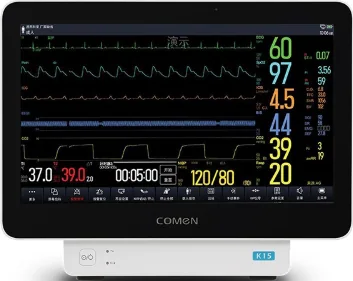
The engineering challenge
A display that works on a bench may be difficult to operate with gloves, unreliable around fluids or cleaning agents, or unsuitable after integration into the medical enclosure. The compliance boundary must be clear between the component supplier and the legal manufacturer of the equipment.
Translate clinical workflow into touch requirements
Document who operates the screen, whether they wear gloves, the expected interaction frequency, viewing distance, display orientation and whether accidental touches could affect a clinical or diagnostic function. Define supported glove types and thickness only from the actual user need, then evaluate touch accuracy, palm rejection, wet-finger behavior and recovery after cleaning on the production-intent cover lens.
List the cleaning agents, wipe method and frequency expected in use. Confirm material compatibility for the cover glass, coatings, adhesive, printed areas and seals. Do not assume that “medical grade” describes a specific touch performance or chemical-resistance test.
Define enclosure and system compliance boundaries
IEC 60601-1 addresses basic safety and essential performance of medical electrical equipment and systems; applicable collateral or particular standards may add requirements. IEC 60601-1-2 addresses electromagnetic disturbances for medical electrical equipment and systems. The equipment manufacturer determines the applicable standards, risk controls and system test plan. A display module, touch panel or supplier certificate should not be presented as certifying the finished device unless the scope expressly supports that claim.
If ingress protection is required, specify the tested enclosure, installed orientation, seams, connectors and test conditions. IP classification under IEC 60529 is not a property that can automatically be transferred from one component to a different finished enclosure.
Validate the intended stack and use conditions
Use the final cover lens, bonding method, controller, firmware, cable, host board, enclosure and power arrangement. Test touch operation while wearing the specified gloves and under the expected moisture and cleaning conditions. Review EMC behavior with the real cable routing, grounding and operating modes. Maintain a traceable record of samples, revisions, test methods, deviations and approvals.
Parameters to compare
| Requirement | Define before RFQ | Evidence to review |
|---|---|---|
| Touch workflow | Glove type, wet interaction, target size and error tolerance | Usability protocol and production-stack sample results |
| Cleaning | Agents, concentration, contact time and wipe method | Material compatibility or repeated-cleaning test evidence |
| Protection | Required enclosure boundary and installed configuration | Applicable enclosure test report and limitations |
| EMC/safety | Applicable device standards and essential performance | System-level plan, configuration and test responsibility |
Keep medical-equipment compliance at the system boundary
IEC 60601-1 addresses basic safety and essential performance of medical electrical equipment and systems. Do not imply that a display or touch panel makes the finished device compliant unless the certificate and test evidence explicitly cover that configuration and scope. Preserve Touchara-held certifications exactly as documented; the equipment manufacturer remains responsible for final-system assessment and applicable collateral or particular standards.
Specify the enclosure test separately. IEC 60529 IP65 and ISO 20653 IP69K refer to defined enclosure protection tests; the K designation is road-vehicle scoped, so these labels are not a generic continuum or interchangeable claims. Select the test standard and conditions required by the target market. Test the final assembly, seals, cable entries and mounting. Validate glove and fluid interaction with the actual controller, cover stack, cleaning agents and workflow.
OEM decision framework
The finished medical equipment manufacturer should own the intended-use definition, risk management and compliance plan. Ask the display supplier for accurate component data and agreed support, but keep system certification claims tied to the tested device configuration and responsible legal manufacturer. If touch behavior is safety- or diagnosis-relevant, define acceptance criteria and change control accordingly.
RFQ checklist
Include these items with the inquiry so suppliers can quote and validate the same configuration:
- Intended user, glove and cleaning requirements
- Final optical stack, cover lens, controller and cable configuration
- Required enclosure protection and system compliance targets
- Sample validation plan, acceptance limits and responsible party
- Change notification and revision traceability requirements
Standards and references
- IEC 60601-1 — medical electrical equipment basic safety and essential performance
- IEC 60529 — enclosure IP code
- ISO 20653:2023 — road-vehicle IP codes including K designations
Check the applicable edition and scope for your equipment before specifying a test or making a compliance claim.
- IEC 60601-1 — basic safety and essential performance
- IEC 60601-1-2 — electromagnetic disturbances
- IEC 60529 — enclosure IP Code
Preparing an OEM display inquiry?
Share the target size, interface, operating conditions, mechanical drawing and expected quantity for a project-specific discussion.